
Phishing Reporter Page View Failure Due to Deprecated Exchange Online Tokens

The Phishing Reporter Page View feature fails due to Microsoft's deprecation of legacy Exchange Online tokens earlier than expected date, June 2025.

Affected Systems

  • Microsoft 365 users utilizing the Phishing Reporter Page View feature.

Symptoms

If you are using the Phishing Reporter Page View version, it may fail with the following empty message:

Empty message shown when Phishing Reporter Page View fails due to deprecated Exchange Online tokens.

Root Cause

Microsoft has deprecated legacy Exchange Online tokens, which the Phishing Reporter previously relied upon for authentication and access.

Short Term Solution

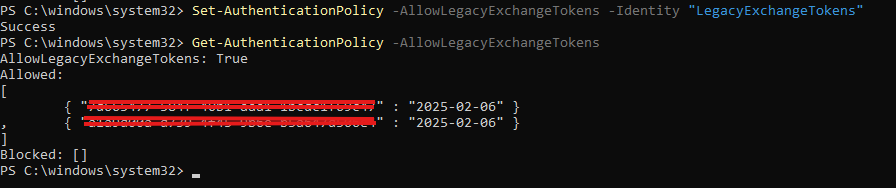
Admins can re-enable legacy Exchange Online tokens for their tenant by using Exchange Online PowerShell and the Set-AuthenticationPolicy command. For the deprecation timeline, token behavior, and migration guidance (NAA/MSAL), see Microsoft's Nested app authentication FAQ - Legacy tokensarrow-up-right.

See also: Regarding deprecation of exchange tokensarrow-up-right (Microsoft Q&A) for community discussion and admin re-enable options.

circle-exclamation
Exchange Online PowerShell — Allow Legacy Token sample.
Picture 1: Exchange Online Powershell - Allow Legacy Token Sample

Long-Term Solution

A more permanent solution, we highly recommend using Microsoft Ribbon Phishing Reporter that utilises Graph API and no dependency on Exchange Online tokens.

FAQ:

Q: Why is it happening now?

A: Legacy tokens turned off for all tenants before the scheduled date before June.

Date
Legacy tokens status

Feb 17th, 2025

Legacy tokens turned off for all tenants. Admins can reenable legacy tokens via PowerShell.

Jun 2025

Legacy tokens turned off for all tenants. Admins can no longer reenable legacy tokens via PowerShell and must contact Microsoft for any exception.

Oct 2025

Legacy tokens turned off for all tenants. Exceptions are no longer allowed.

https://learn.microsoft.com/en-us/office/dev/add-ins/outlook/faq-nested-app-auth-outlook-legacy-tokensarrow-up-right

Last updated